 myblogger9ja@gmail.com
In an era dominated by digital transactions, Paystack has carved its niche as a formidable player in the online payment landscape.
This blog post aims to illuminate the multifaceted nature of Paystack payments, providing an in-depth exploration of its purpose, the process of creating an account, the security measures implemented, the spectrum of supported currencies, the seamless fund withdrawal process, the user experience, integration possibilities through APIs, and the robust customer support that underpins this platform.
What is Paystack?
To truly understand Paystack, it’s essential to trace its roots. Founded in 2015 by Shola Akinlade and Ezra Olubi who met at Babcock University and worked in banking and IT with the vision of simplifying online transactions in the African market, Paystack has evolved into a global player.
It became the first Nigerian company to be accepted into the startup accelerator Y Combinator and was acquired in 2020 by Stripe for $200M.
What is Paystack Used for?
Paystack isn’t just a payment gateway; it’s a versatile tool catering to diverse needs. From seamlessly integrating with e-commerce platforms to facilitating subscription-based services and supporting transactions for digital products and services, Paystack’s purpose extends beyond conventional online payments.
How to Register Paystack Account
Embarking on the Paystack journey begins with creating an account. This section offers a detailed step-by-step guide, from the initial registration process to account setup and verification. Users gain insights into the customization options available within Paystack user profiles, setting the stage for a personalized experience.
- Begin by following this link to provide paystack with your business name, email address, country, and password for your account: https://dashboard.paystack.co/#/signup
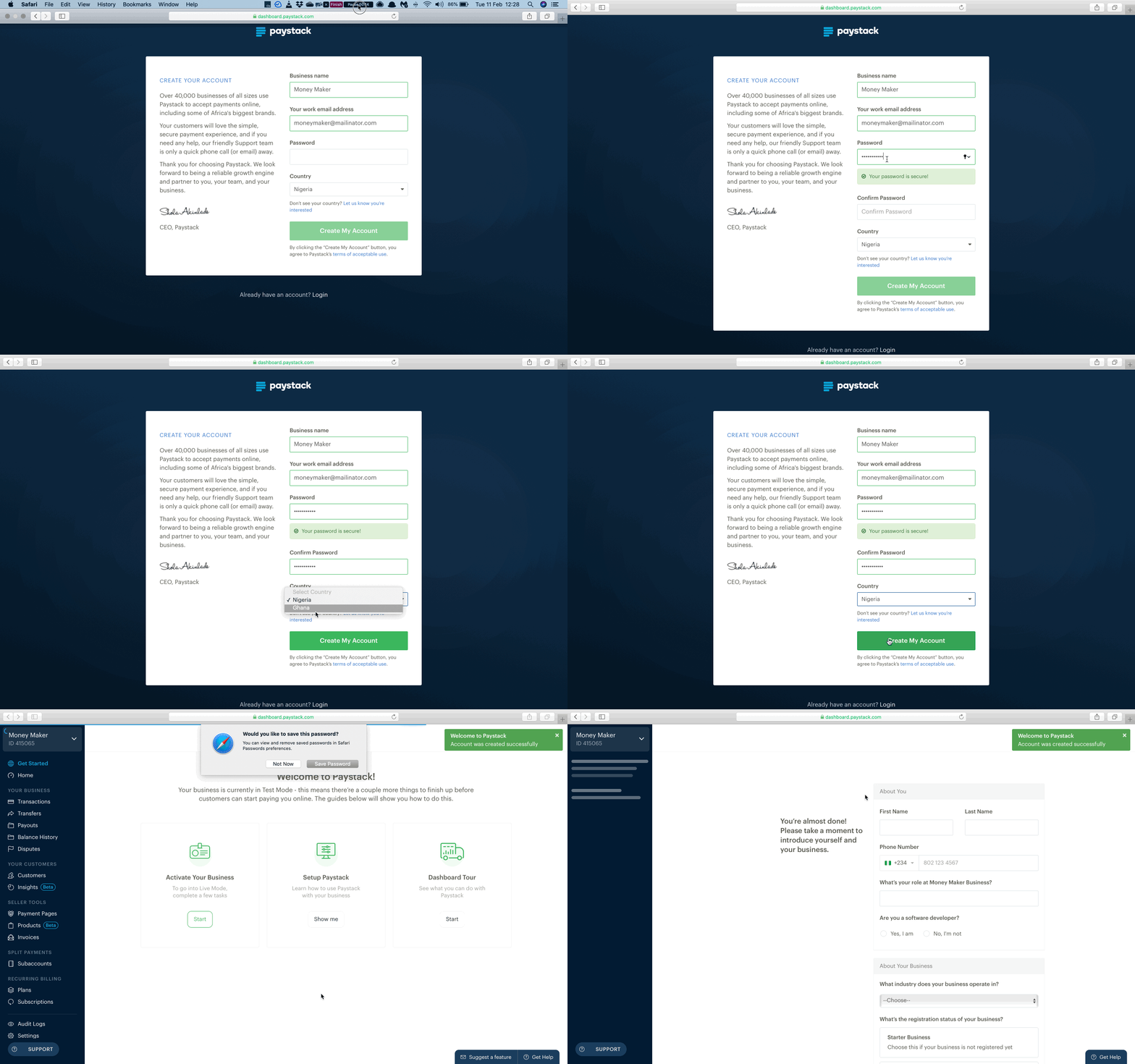
- At this point, your account has been created. However, Paystack will need more information about you and your business before you can start using it. You’ll be redirected to another page asking for detailed information, simply provide all that is required to complete your setup.
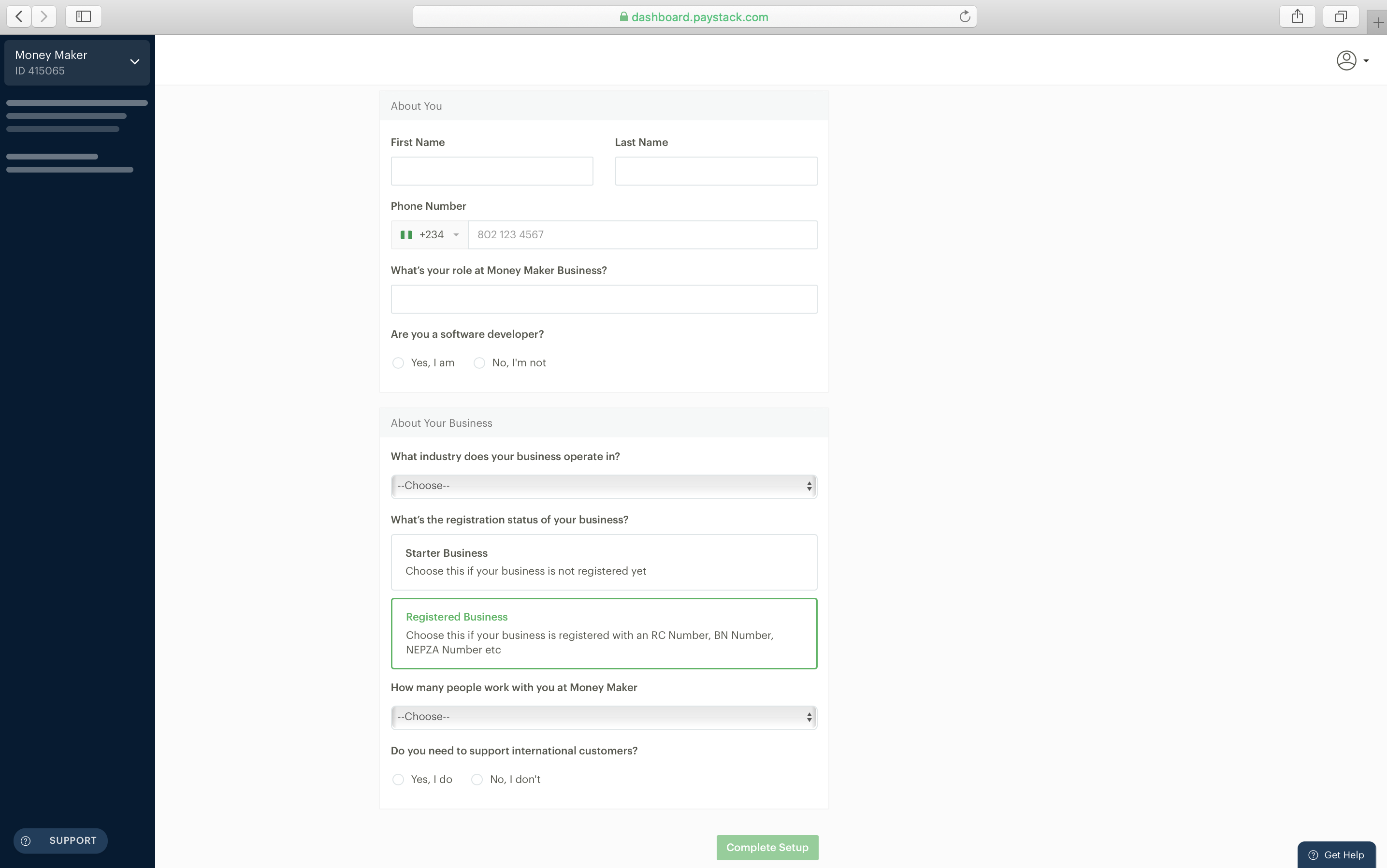
- Once your setup is complete you’ll be redirected to your dashboard. Congratulations, you’ve just created your Paystack account!
After creating your account, you are able to start testing your integration and playing around with our product suite.
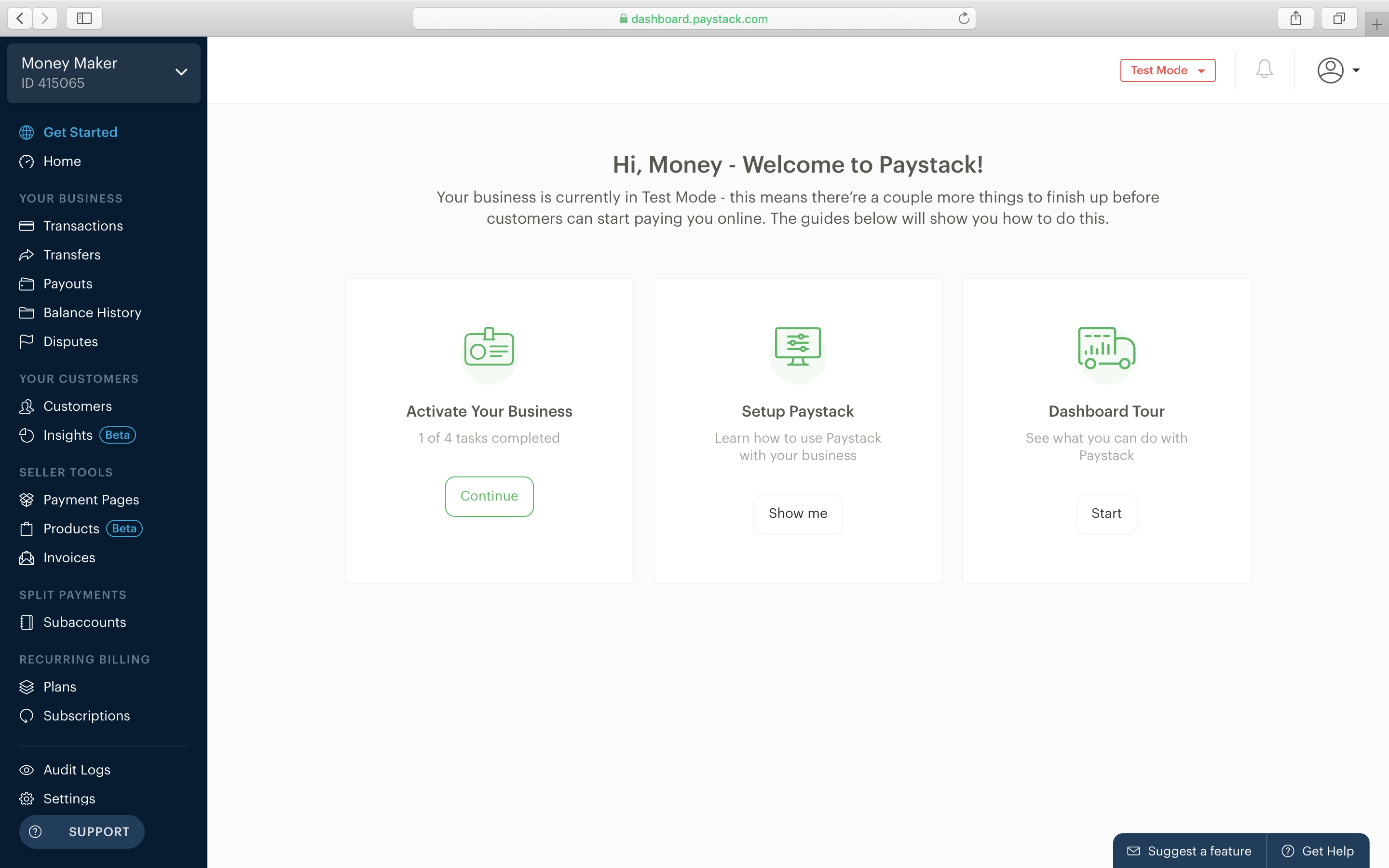
However, your account is still in Test Mode and you cannot receive real money. You will have to activate your account to take it Live and start collecting real money from your customers. Follow this link to activate your business: https://dashboard.paystack.com/#/get-started/activate.
Once you’ve submitted an activation request you should get feedback from Paystack within 48 hours.
Security Measures of Paystacks
In an age where security is paramount, Paystack prioritizes user safety through robust measures. Encryption protocols, two-factor authentication, and fraud prevention mechanisms are explored in detail, assuring users of the platform’s commitment to securing sensitive information and transactions. Some of the measures include:
Sensitive data and communication encryption
Paystack uses an in-house developed Vault application to encrypt, store, and transmit cardholder data. The Vault encrypts cardholder data using a 2048 RSA Key with 3DES 112-bit encryption, before storing it in its database. This Paystack Vault hosts its database on Amazon Web Services’ (AWS) Relational Database Service (RDS) platform. AWS RDS uses the industry standard AES-256 encryption algorithm for encryption of all data-at-rest in the database.
Vulnerability disclosure and reward program
By submitting a security bug or vulnerability to Paystack through HackerOne, you acknowledge that you’ve read and agreed to the program’s terms and conditions. Users can be rewarded if they figure out weak points from the payment processor. This can help maintain the security of the platform.
HTTPS and HSTS for secure connections
Paystack mandates the use of HTTPS for all services using TLS (SSL), including their public website and the Paystack Dashboard. They regularly audit the details of their implementation, including the certificates served, the certificate authorities used, and the ciphers supported. Paystack uses HSTS to ensure that browsers only interact with Paystack over HTTPS. Paystack is also on the HSTS preloaded lists for all modern major browsers.
Supported Currencies
Paystack’s strength lies in its global accessibility, supporting transactions in multiple currencies. This section provides a list of supported currencies making it an ideal solution for businesses operating on an international scale.
| Currency code | Base unit | Description |
|---|---|---|
| NGN | Kobo | Nigerian Naira |
| USD | Cent | United States Dollar |
| GHS | Pesewa | Ghanaian Cedi |
| ZAR | Cent | South African Rand |
| KES | Cent | Kenyan Shilling |
Paystack Customer Support
Even with a user-friendly platform, questions and issues may arise. Paystack ensures reliable customer support to address user queries promptly. This section provides information on the various channels available for users to reach out to Paystack’s customer service, showcasing the platform’s commitment to building trust and ensuring a positive user experience.
To Report Fraud:
Contact their fraud hotline at reportfraud@paystack.com or +234 20 163 16187
For General Support:
Send a quick email using their contact page https://paystack.com/contact/support
Conclusion
In conclusion, Paystack emerges as a payment gateway and a comprehensive digital financial solution. Its adaptability, security measures, and commitment to user experience position Paystack as a reliable ally in the ever-evolving landscape of online payments. As businesses and individuals navigate the digital frontier, Paystack stands at the forefront, facilitating secure, convenient, and efficient financial transactions.

 myblogger9ja@gmail.com